

Denon AVC-X3800H: Channel Planning, HDMI/eARC and Calibration Dependencies
The AVC-X3800H supports an extensive AV feature set, but the buying decision depends on channel plan, source and display paths, amplification, subwoofers, room correction and firmware.
When Real Integration Contradicts the Promise of the Spec Sheet
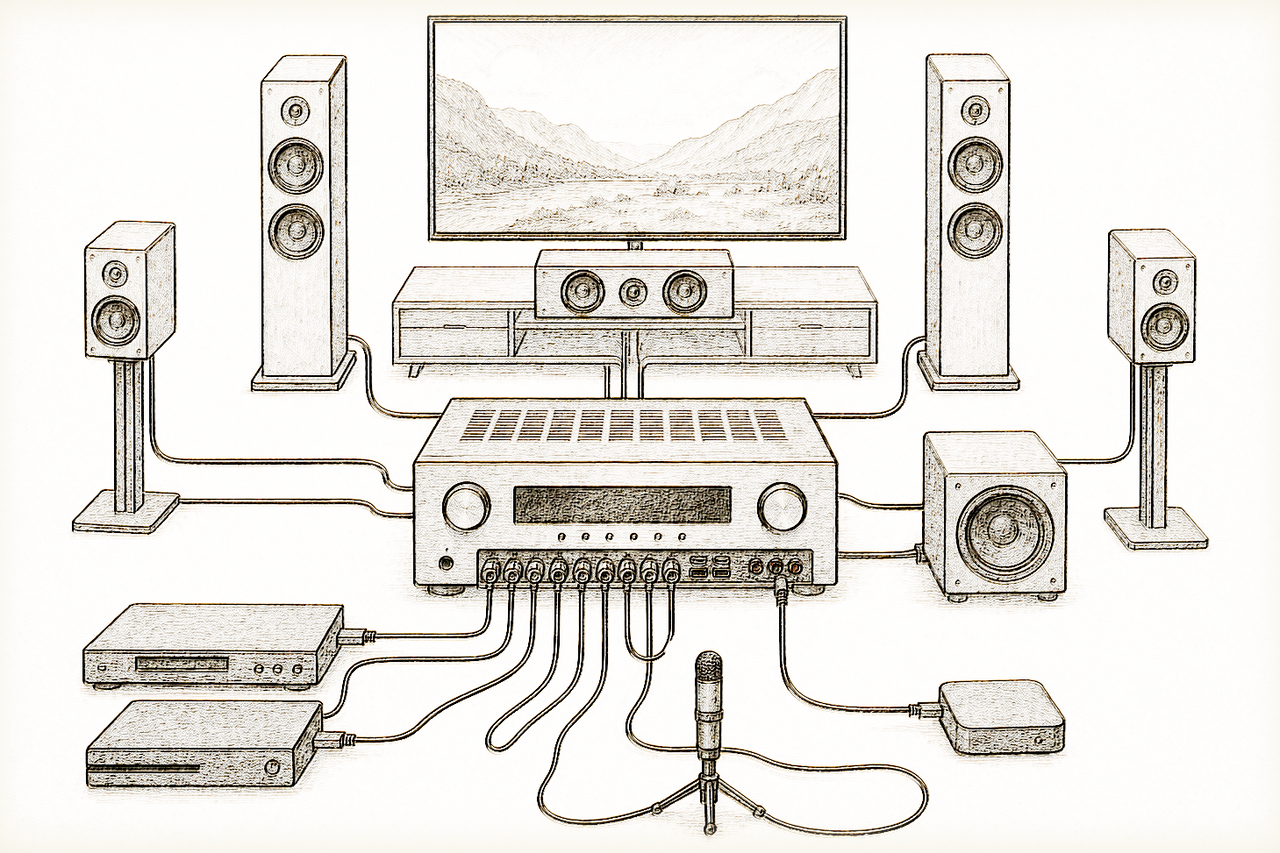
The AVC-X3800H’s format badges describe capability, not a finished system. Víctor Torres starts with a dependency map: intended channel layout, internal or external amplification, subwoofer plan, source-to-display HDMI path, eARC return, room correction and control. Each choice constrains the others.[1][2]
Evidence boundary: Denon’s manuals are the primary authority for supported configurations and setup behaviour. Retail, forum and video material may reveal questions but cannot override current documentation. LineaSonora did not install, calibrate or interoperability-test this receiver.[1][2][3][4]
The Usage Scenario: The Entire System, Not Just the Receiver
In practice, an AV receiver like the Denon AVC-X3800H must be integrated with various sources—streamers, consoles, Blu-ray players, control systems, and displays—and process all channels required by modern formats, with a configuration that goes far beyond just “plug and play.” The 9 amplified channels specification is useful, but many Atmos setups demand 11 or more active channels, so the X3800H can only process 11 full channels by adding external amplification for the extra channels[5][1]. This means users must understand their system's topology: can it drive everything that the processing promises? Merely reading the manual is not enough; one must interpret which functions are available, in which modes, and under what limitations.
Involved Standards: HDMI, eARC, and “Future-Proof” Formats
Full HDMI 2.1 is promoted as “state of the art,” but true 8K, HDR10+, and Dolby Vision compatibility depends on the entire chain of devices and cables. Denon promises 8K 60p video input and output and HDCP 2.3 compliance, but actual operation with certain displays, projectors, and media sources will require each segment's compatibility to be verified. eARC (Enhanced Audio Return Channel) support is indeed implemented, but its daily reliability depends on all connected devices—including the TV—being properly configured and updated. HDMI issues often stem from inadequate cables or incompatible setups, leading to loss of multichannel sound, signal pass-through limitations, or CEC control conflicts[1]. Such difficulties do not appear in feature lists and cannot be resolved just by “buying the receiver with the most logos.”
Compatibility and Limits: Power Is More Than Just a Number
A key aspect—and a frequent source of confusion—is the power rating per channel. While marketing materials and some independent retailers cite 180 W per channel, official documentation and specialized press agree that the Denon AVC-X3800H provides 105 W per channel at 8 Ω, measured under standard conditions[5][1][6]. This difference highlights a common mistake: many promotional numbers exaggerate power by using less demanding loads (such as 6 Ω or a single frequency), while the real output with all channels driven is noticeably lower. Here, buyers should be cautious: if you're using low-sensitivity speakers or large rooms, it's important to study whether the available amplification will be sufficient—especially when adding height channels and multi-subwoofer setups.
Multizone management also deserves a realistic analysis: although the receiver allows output for zone 2 and zone 3, this often means reassigning channels and relinquishing some advanced functions in the main room. There is no magic: a system can only distribute resources that the architecture itself allows. Denon does provide clear information on these amplifier assignments, although many users discover this only after the fact.
What to Check Before Buying: Critical Dependencies
For the Denon AVC-X3800H to deliver on its promise in a real room, buyers need to carefully review several key points:
- Actual Channel Assignment: To achieve a true 7.1.4 setup (with four Atmos height speakers), you must add external amplification for the two extra channels, as the Denon only natively amplifies nine[5][1].
- Complete HDMI/eARC Chain: Advanced signal compatibility (8K, HDR10+, etc.) depends on the display, cables, and sources all properly supporting HDMI 2.1 and eARC. Incompatibilities can limit multichannel sound, cause latency, or disable features[1].
- Subwoofer and Bass Management: The processor supports up to four independent subwoofers, offering flexibility for complex rooms, but taking advantage of this requires proper setup of phases, levels, and crossovers; the spec sheet is no substitute for professional calibration.
- HEOS Streaming and Control: Although HEOS Built-in facilitates multiroom integration, operating multiple zones and services requires familiarity with the ecosystem and apps, with certain functions depending on the local network or firmware. The same applies to Alexa, Google Assistant, and AirPlay 2: useful, but their real-world functionality may be limited by external variables.
- Electrical Parameters: Never assume that catalog power figures translate directly to real in-room dynamics. Available power drops when all channels are driven by demanding signals[5][6].
What’s Never Mentioned: Potential Issues and Verifying Sources
Many integration problems—HDMI failures, channel loss, streaming errors, subwoofer hum, loudspeaker incompatibilities—surface only after installation, never during a store demo. Most of these result from misinterpreting stated capabilities versus the actual installed system topology. For example: the 11.4 channels that can be processed always require extra amplification stages and proper menu assignment; support for multiple subwoofers demands accurate adjustment to avoid room cancellations. Moreover, voice-control and streaming interoperability depend on both Denon's software and the network environment, and may be affected by firmware updates, routers, or third-party apps.
This is why the best decisions aren't made solely by comparing product sheets. To avoid “surprises”—be it power limits, HDMI issues, or incomplete integration—it is vital to rely on official documents and specialized press, not on ambiguous promotional claims or sales estimates[5][1][6]. The Denon AVC-X3800H is undoubtedly a capable receiver for mid-to-upper-tier home cinema systems, but it will only reach its full potential when the system design and installation are as thorough as selecting the device itself.
Preserved from the Sony–Denon page: test the television end separately
The earlier Sony–Denon article identified one useful point that belongs in this stronger receiver guide: compatibility has to be recorded at both ends of the HDMI chain. A television may expose eARC on only one port, may require an enhanced signal mode for a particular video format, and may report the active audio format only on the receiver. Sony’s own support guidance says that both devices must support eARC, that an ARC-only endpoint limits the return path, and that the audio system’s display is the practical place to confirm a high-bitrate format.[7]
For each source, record the source output mode, Denon input, Denon monitor output, exact television port, television signal-format setting, audio format returned over eARC and the fallback that still works. When ARC/eARC fails, Sony’s documented sequence begins with the designated ARC/eARC ports, control-device recognition, cable state and a power reset; that is a reproducible diagnostic boundary, not evidence that two logo-compatible products are universally interoperable.[8]
The Denon manual adds its own dependency: HDMI Control settings and CEC behaviour are mode-specific, and changing control settings may require a power restart. The result is a recoverable matrix rather than a claim that every Sony television or every firmware revision has been tested by LineaSonora.[9]
A go/no-go checklist for this receiver
Proceed only when the required channel plan, amplification, HDMI sources, display, eARC path and subwoofer strategy are all supported. Leave room for firmware and room-correction verification. The best match is not the AVR with the longest badge list; it is the one whose complete path can be documented and recovered.